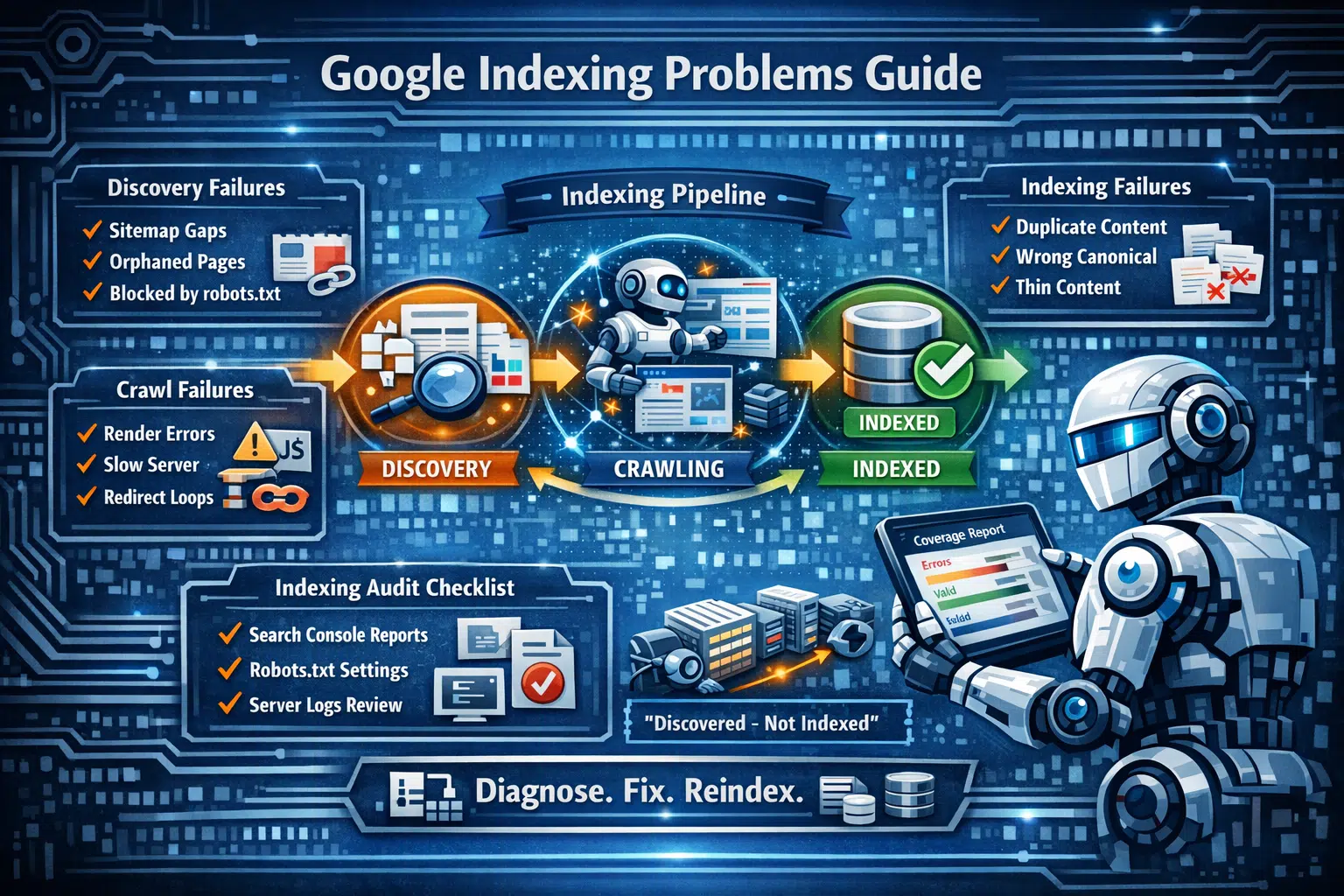
This article covers every major type of indexation failure, how to diagnose each one, and how to fix it correctly — written for agency staff who need to explain the problem to clients and solve it effectively.
The Indexing Pipeline: What Has to Go Right
Understanding what needs to work before diagnosing what broke is essential. Google's inclusion of a webpage happens in three stages: discovery (Google must find the URL), crawling (Googlebot must successfully retrieve the page content), and indexing (Google must determine the page is worth adding to its database).
All three failure types produce a "not indexed" status — but identifying which stage failed completely changes the diagnosis and fix. Most clients, and even beginners, assume there is one problem with one solution. That assumption causes most wasted remediation effort.
Checking a page's status via URL Inspection in Search Console is fast. Correctly interpreting the result is where experience matters — because each status code points to a completely different root cause and solution.
Stage 1 — Discovery Failures: Google Doesn't Know the Page Exists
A page that has never been discovered by Google shows the status URL is not on Google in Search Console. Discovery issues typically affect four categories:
Never-Discovered Pages
Pages newly added to the site that haven't been linked from any existing indexed page and haven't been submitted via sitemap may take days or weeks to be discovered through conventional crawling. Fix: Submit the URL through the URL Inspection tool in Search Console and confirm the page is included in the XML sitemap.
Non-Mapped Pages
Pages that exist but were excluded from the sitemap by plugins — WooCommerce, Elementor, and many WordPress SEO plugins frequently omit certain page types — may never be discovered. Checking sitemap architecture for completeness is a standard step in any technical SEO audit.
Orphaned Pages
Pages not linked internally are reachable only through the sitemap. If they're absent from the sitemap too, they are entirely unreachable to Googlebot. Any active site should run a quarterly internal link audit highlighting pages with zero or one inbound internal links.
Disallow in robots.txt
A Disallow rule in robots.txt tells Googlebot not to crawl a URL or URL pattern. Google may still be aware the page exists if it's referenced in the sitemap while being blocked in robots.txt — a contradictory setup that confuses Google and must be resolved by either removing the page from the sitemap or unblocking it in robots.txt.
Stage 2 — Crawl Failures: Google Found the Page but Couldn't Read It
Crawl issues appear in Search Console as Crawled – currently not indexed, Discovered – currently not indexed, or in crawl issue reports. The URL is known to Google, but content retrieval either failed or returned content Google considered unsatisfactory.
Render-Blocking JavaScript
Sites that inject core content — product descriptions, article body text, navigation links — via JavaScript frameworks can cause crawl failures because Googlebot has limited JavaScript rendering resources. Google uses a queuing system for rendering that can take days or weeks after the initial crawl. Pages whose content only exists in the rendered version face serious crawl phase barriers. Critical content should always be present in the initial HTML response.
Server Response Problems
Intermittent 5xx error codes, server response times over 2.5 seconds, and connection timeouts all cause crawl failures. These don't always appear in Search Console immediately because Google retries — crawl failures only become visible once they're repeated. Server response times and server errors for Googlebot specifically should be checked in server logs filtered by Googlebot user agents, not just by overall server monitoring.
Redirect Chains and Loops
When URL A redirects to URL B, which redirects to URL C, the result is a redirect chain. Google will follow chains of up to five hops but deprioritises pages requiring many redirects. A redirect loop — where A redirects to B, which redirects back to A — makes indexing completely impossible. Both situations should be identified and flattened to direct redirects during any technical audit.
Stage 3 — Indexing Failures: Google Crawled the Page but Chose Not to Index It
Indexing failure is the most subtle stage because it requires understanding what Google considers a quality page. These are the most common GSC statuses in this category and what each one means:
Duplicate without user-selected canonical
Google found this page's content to be substantially similar to another page and chose to index that other one instead. The fix is to add a canonical tag pointing to the intended canonical page. If the site has duplicate content by design, it needs either content differentiation or a redirect from the duplicate to the primary.
Alternate page with proper canonical tag
This status means the page carries a canonical tag pointing to a different URL — which is the expected state when canonical tags are intentionally used. If this status appears on a page that should be indexed, it means the canonical tag is wrong or has been applied unintentionally, usually by a plugin or CMS template.
Crawled – currently not indexed
Google crawled the page but decided indexing wasn't warranted. Primary causes include thin content (below ~300 words or lacking value relative to already-indexed pages), insufficient PageRank relative to other pages on the site, and mismatch between the declared topic and actual page content. Remediation involves increasing content depth, building more internal links to the page, and in some cases waiting for external signals to accumulate.
Discovered – currently not indexed
Google knows about the URL but hasn't crawled it yet — a crawl budget problem. The URL is in the queue, but Google doesn't have sufficient crawl budget to reach it. Sites with large numbers of low-value URLs (parameter variations, tag archive pages, thin category pages) can exhaust their crawl budget entirely before Googlebot reaches the valuable content pages. The solution is reducing the total count of URLs Google is invited to crawl.
Building a Repeatable Indexing Audit Process for Agency Clients
Healthy indexing is an ongoing requirement, not a one-time fix. Pages drop from the index, new pages fail to get indexed, and crawl budgets shift as sites grow. The following monthly audit steps can be delivered as a standing agency output:
Monthly Indexing Audit Checklist
robots.txt rules for accidental disallow directives — especially after site updates, which frequently introduce new blocks via WordPress caching or SEO plugin changes
Additional Resources
Pam Harper
Founder of Harper Media Group. 20+ years of web development, 12+ years of technical SEO. Specializing in technical SEO, structured data, and AI optimization — delivered white-label for agencies.
About Pam Harper